



Courses that are identified as trigger courses for state assessments, such as PSSA's, PASA's, and Keystones need to be properly identified in Focus. To assist in preparation for PVAAS reporting, each building should add the appropriate data when creating a new course and review their existing courses and sections. Ideally, this would take place prior to the beginning of the school year, and modifications can be made up until the PIMS Administrator generates the PVAAS Staff and Student Subtest entries during the C6 PVAAS data collection reporting window.
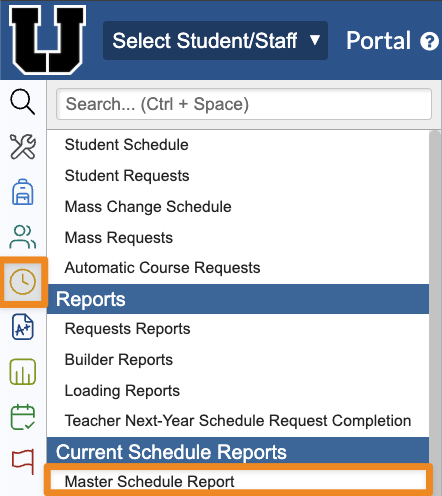
1. Go to the Scheduling menu, then click on the Current Schedule Reports submenu and choose Master Schedule Report.
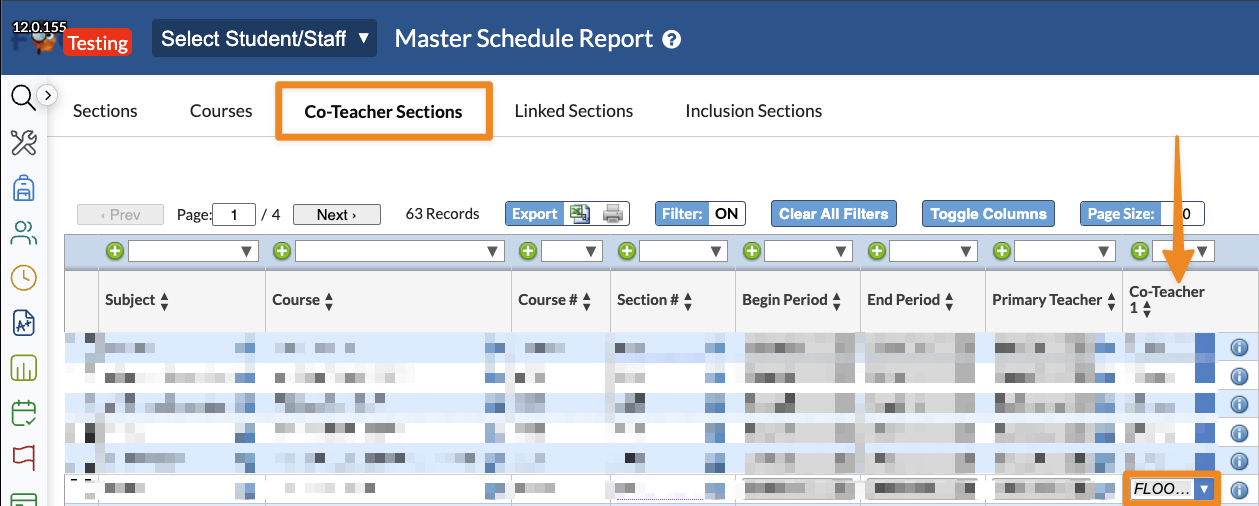
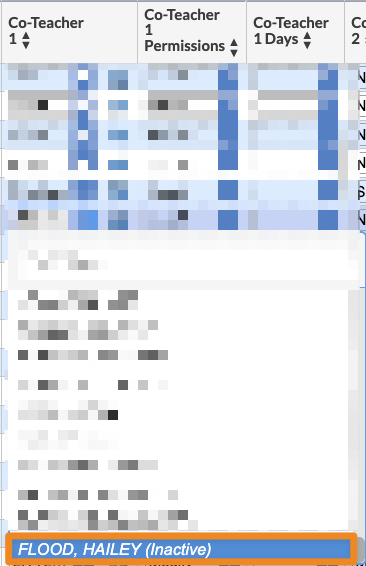
2. From the Master Schedule Report, select the Co-Teacher Sections tab. Beginning with the Co-Teacher 1 column, review the assigned teachers to confirm that all staff members are active. Inactive staff members' names will appear in italics, with (Inactive) following their name. These should be removed or replaced with a valid teacher's name. Click the red Save button when finished.
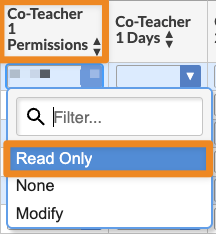
3. Co-Teacher permissions should be evaluated during this audit. Read Only is the strongly recommended option. Co-Teacher Days should be left blank. Save after any adjustments.
4. Repeat for each subsequent Co-Teacher column, if necessary.

